How I automated Threads with Claude: our path, the mistakes and a $0 setup

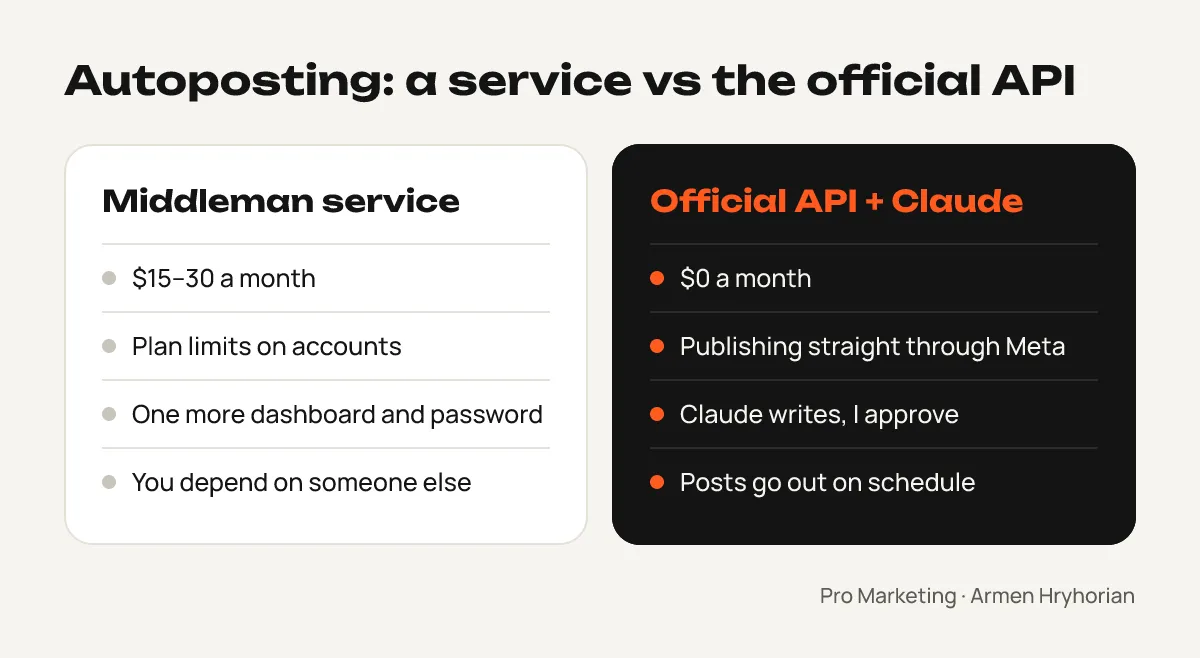
Autoposting tools cost $15–30 a month, and most of them are just a middleman between you and the social network’s official API. I decided to cut out the middleman and connected my Threads account directly to Claude.
Here’s how it works now: Claude writes a post and makes a branded image for it, I approve it, and it goes out on its own, on schedule. The first post went live on November 1, and the whole setup, mistakes included, took about three hours.
Below is the full path: what we tried, where we went wrong and how to do the same without the detours.
Mistake 1: a tool that “supports everything”
We started with a popular tool, Typefully. Its homepage mentions Instagram, but it can only publish to X, LinkedIn, Threads, Bluesky and Mastodon. Not Instagram, not Facebook. We found that out after signing up, when nothing worked.
Takeaway: before you pay or spend time on setup, find the exact list of networks a tool publishes to in its documentation — not the ones it mentions in its marketing.
Mistake 2: looking for yet another tool
Next I looked at Postiz, an open-source tool. In the cloud it starts at $29 a month for 5 accounts. You can self-host it for free, but then you still have to create your own Meta apps and go through their setup.
That’s when it clicked: if I have to build the Meta app myself anyway, I don’t need a middleman. Claude can publish straight through the official API. It’s free, and no third-party service sits between me and my account.
Takeaway: sometimes the simplest solution isn’t a better tool — it’s no tool at all.
Mistake 3: the AI mixed up projects
I run several projects, and at first Claude started laying out the setup for the wrong brand. No harm done, but it took a few minutes to sort out.
Takeaway: keep each project in its own space (in Claude, that’s Projects) and say up front which brand the task is for.
How to set up Threads API access
The Meta part takes 15–20 minutes if you know where to click.
- Make sure your Threads profile is public. Tokens can only be generated for public accounts.
- Create an app at developers.facebook.com → My Apps → Create app. When asked for a use case, pick Access the Threads API. It can’t be combined with Facebook and Instagram, so those will get a separate app later.
- Add permissions:
threads_basicandthreads_content_publish(publishing), plus the reply and insights permissions if you want them. - Add yourself as a tester. App roles → Add People → Threads Tester role → your username. You don’t need to publish the app or go through Meta’s review: development mode is enough for your own account.
- Accept the invite in Threads: Settings → More settings → Website permissions → Invites → Accept.
- Generate a token: at the bottom of the Threads use case settings there’s a User Token Generator. Click Generate Access Token, allow access, and you get a long string that’s valid for about 60 days.
The token is effectively the password to your Threads account. Don’t publish it or put it in code. If you ever need to revoke access in a hurry, just remove yourself as a tester.
Mistake 4, the big one: “The user has not accepted the invite”
I had accepted the invite, but the token generator kept returning The user has not accepted the invite to test the app. We removed the tester, added them again, waited, tried from a phone and from a laptop — nothing.
The cause wasn’t obvious. In the browser, Threads was logged in under a different profile. At some point Threads had automatically created an empty profile for me, tied to another Instagram account, with an old name and zero followers. The profile picture was the same, so at first glance I didn’t notice. The generator was using that profile, while the invite had been accepted on my main one.
Meta’s Accounts Center confirmed it: it listed several separate Threads profiles. As soon as I logged out in the browser and logged in to my main account, the token generated on the first try.
Takeaway: before generating a token, open threads.com in the same browser and check the username and follower count. It’ll save you an hour.
Mistake 5: one letter
For Claude to reach the API, the graph.threads.net domain has to be added to the allowed domains in Claude’s settings (Settings → Capabilities). I typed graph.treads.net — no h — and publishing didn’t work until Claude spotted the typo.
Takeaway: copy technical addresses instead of typing them.
Mistake 6: you can’t just attach an image
The Threads API doesn’t accept an image file — only a public link to it. The solution was something I already had: my site lives on GitHub and deploys itself to Cloudflare. Claude makes the image in my brand style, puts it on the site, and a minute or two later it’s available at a public link. Then it publishes the post with that image.
How the autoposting works now
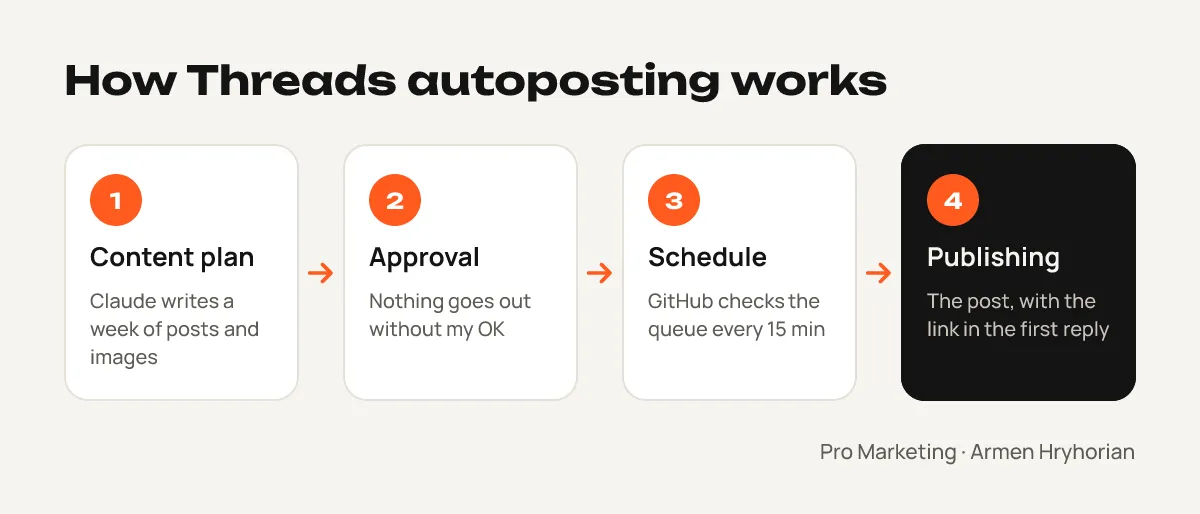
- Content plan. Once a week Claude drafts a plan: 2 posts a day, content pillars, texts and images. I review it in a doc and edit where needed.
- Approval. Nothing is published without my OK. Every post in the schedule is flagged as approved or not.
- Schedule. The post queue lives in the site’s repository. Free GitHub Actions checks every 15 minutes whether the next post is due and publishes it through the API.
- Links go in the first reply. Posts with links get less reach, so the link to the article is automatically added as the first comment under the post.
- Notification. After publishing, I get a link to the post in Telegram.
What we learned about the Threads algorithm
Automation is only half the job. For people to see your posts, you need to write for the algorithm:
- 1–2 posts a day is the sweet spot for accounts under 1,000 followers; past ~5, your posts start competing with each other.
- Posts with images get noticeably more engagement than text posts — about 60% more, according to Buffer’s data.
- Replies matter a lot. The algorithm predicts whether someone will want to reply, so end your post with a real question.
- One language per account. Mix languages and part of your audience scrolls past, teaching the algorithm that your content doesn’t interest them.
- Post topic. Through the API you can add one topic per post — it helps you reach people who follow that topic.
- Timing. For a Ukrainian audience, weekday mornings work well, 7–9 a.m. Kyiv time.
What it costs
| Item | Cost |
|---|---|
| Threads API and the Meta app | $0 |
| GitHub Actions for scheduling | $0 |
| Image hosting on my own site (Cloudflare) | $0 |
| Middleman service | not needed |
The only thing I pay for is my Claude subscription, which I already use for the site, analytics and content.
What’s next
Next up: connecting Facebook, Instagram and the Telegram channel the same way, so one approved content plan goes out across every network. I’ve already written about building the site with AI in the one-evening website case study, and about setting up free analytics in the Telegram report case study.
If you want your marketing team to build automations like this with AI themselves, there’s team training. And if you’re a marketer who wants to grow into someone who automates the routine instead of drowning in it, come to mentoring.